
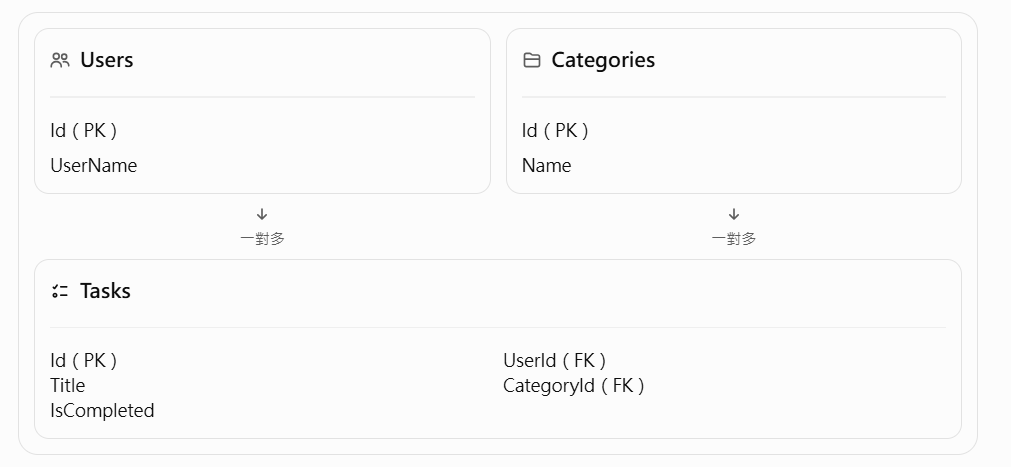
繼續使用昨日專案
在 VS Code 左側開啟:TaskFlow3.Api → Models
新增一個檔案:AppUser.cs
namespace TaskFlow3.Api.Models
{
    public class AppUser
    {
        public int Id { get; set; }

        public string UserName { get; set; } = "";

        // 一個使用者可以有多筆任務
        public List<TaskItem> Tasks { get; set; } = new();
    }
}
namespace TaskFlow3.Api.Models
{
    public class TaskItem
    {
        public int Id { get; set; }

        public string Title { get; set; } = "";

        public bool IsCompleted { get; set; }

        // Day 21:分類關聯
        public int? CategoryId { get; set; }

        public Category? Category { get; set; }

        // Day 22:使用者關聯
        public int? UserId { get; set; }

        public AppUser? User { get; set; }
    }
}
using Microsoft.EntityFrameworkCore;
using TaskFlow3.Api.Models;

namespace TaskFlow3.Api.Data
{
    public class TaskFlowDbContext : DbContext
    {
        public TaskFlowDbContext(
            DbContextOptions<TaskFlowDbContext> options
        ) : base(options)
        {
        }

        // 任務資料表
        public DbSet<TaskItem> Tasks { get; set; } = null!;

        // 分類資料表
        public DbSet<Category> Categories { get; set; } = null!;

        // 使用者資料表
        public DbSet<AppUser> Users { get; set; } = null!;

        protected override void OnModelCreating(
            ModelBuilder modelBuilder)
        {
            // Tasks 資料表
            modelBuilder.Entity<TaskItem>(entity =>
            {
                entity.ToTable("Tasks");

                entity.HasKey(t => t.Id);

                entity.Property(t => t.Id)
                      .ValueGeneratedOnAdd();

                entity.Property(t => t.Title)
                      .IsRequired();

                entity.Property(t => t.IsCompleted)
                      .IsRequired();

                // Day 21:分類與任務關聯
                entity.HasOne(t => t.Category)
                      .WithMany(c => c.Tasks)
                      .HasForeignKey(t => t.CategoryId)
                      .IsRequired(false);

                // Day 22:使用者與任務關聯
                entity.HasOne(t => t.User)
                      .WithMany(u => u.Tasks)
                      .HasForeignKey(t => t.UserId)
                      .IsRequired(false)
                      .OnDelete(DeleteBehavior.SetNull);
            });

            // Categories 資料表
            modelBuilder.Entity<Category>(entity =>
            {
                entity.ToTable("Categories");

                entity.HasKey(c => c.Id);

                entity.Property(c => c.Name)
                      .IsRequired()
                      .HasMaxLength(100);
            });

            // Users 資料表
            modelBuilder.Entity<AppUser>(entity =>
            {
                entity.ToTable("Users");

                entity.HasKey(u => u.Id);

                entity.Property(u => u.UserName)
                      .IsRequired()
                      .HasMaxLength(50);
            });
        }
    }
}
先備份資料庫
先停止伺服器並關閉 DB Browser,將 taskflow-ef.db 複製一份備份。
VS Code 終端機確認目前位於 TaskFlow3.Api,輸入:dotnet build
建立新的 Migration:dotnet ef migrations add AddUsers
更新資料庫:dotnet ef database update
結果
開啟DB Browser for SQLite
前往「執行 SQL」,輸入:
INSERT INTO Users (UserName)
VALUES ('Alice');

INSERT INTO Users (UserName)
VALUES ('Bob');
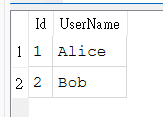
查詢使用者
SELECT * FROM Users;
替任務指定使用者
UPDATE Tasks
SET UserId = 1
WHERE Id = 1;
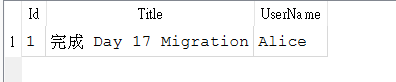
查詢使用者的任務
SELECT
    Tasks.Id,
    Tasks.Title,
    Users.UserName
FROM Tasks
LEFT JOIN Users
    ON Tasks.UserId = Users.Id;

 414570681

 iThome鐵人賽
 看影片追技術